3.7 KiB
3.7 KiB
自动驾驶ros2程序说明文档(基于职业大学小巴)
环境配置
ros 环境
- ubuntu 20.04
- ros2 foxy
第三方库
c++ boost库
sudo apt-get install libboost-all-dev
c++ paho.mqtt.cpp库
# 依赖paho.mqtt.c
git clone https://github.com/eclipse/paho.mqtt.c.git
cd paho.mqtt.c
mkdir build && cd build
cmake .. -DPAHO_WITH_SSL=ON
make
sudo make install
sudo ldconfig

# 安装paho.mqtt.cpp
git clone https://github.com/eclipse/paho.mqtt.cpp
cd paho.mqtt.cpp
mkdir build && cd build
cmake ..
make
sudo make install
sudo ldconfig
python paho-mqtt
pip install paho-mqtt==1.5.1
Yaml
版本号: >= v0.5.2
sudo apt-get update
sudo apt-get install -y libyaml-cpp-dev
libpcap
版本号: >= v1.7.4
sudo apt-get install -y libpcap-dev
配置CAN和网络
# 加载模块
sudo insmod mcp251xfd.ko

# 配置并查看比特率
sudo ip link set can0 type can bitrate 500000
ip -details -statistics link show can0

# cansend
cansend can1 1F334455#1122334455667788
cansend can0 202#0100aa0001f4ffce

# 清除所有文件的时间戳
find . -type f -exec touch {} \;

# 配置ip和物理地址
sudo ifconfig eth0 down
sudo ifconfig hw ether 02805E1F0122
sudo ifconfig eth0 172.31.132.34 up

# 设置can.sh开机自启动:
配置CAN.pdf
#!/bin/bash
# Script: can.sh
# Description: Configures CAN interface can0 on startup

# Check if running as root
if [[ $EUID -ne 0 ]]; then
    echo "This script must be run as root"
    exit 1
fi

# Disable CAN interface can0 if it's up
if ip link show can0 &> /dev/null; then
    ip link set can0 down
fi

# Load necessary kernel modules
modprobe can
modprobe can_raw
modprobe mttcan

# Configure CAN interface can0 with bitrate 250000
ip link set can0 type can bitrate 250000
ip link set up can0

# Check the return status of the last command
if [[ $? -ne 0 ]]; then
    echo "Error configuring CAN interface can0"
    exit 1
fi

echo "CAN interface can0 configured successfully"
exit 0
RTK和惯导
1、请求com1输出gpgga报文
log com1 gpgga ontime 1

2、通过com1传入差分数据,自动差分打开
interfacemode com1 auto auto on

3、请求com3输出所需报文
log com3 <NMEA标准报文> ontime 0.1

4、保存配置
saveconfig

5、开启惯导
inscontrol enable

6、设置惯导 8 种轴向(默认轴向 1,不需要改)
set imuaxestype 1/2/3/4/5/6/7/8

板卡正面朝上,Y轴指向车头,为轴向 1;逆时针旋转 90 度为轴向 2;逆时针旋转 180 度为轴向 3;逆时针旋转 270 度为轴向 4;

板卡正面朝下,Y轴指向车头,为轴向 5;逆时针旋转 90 度为轴向 6;逆时针旋转 180 度为轴向 7;逆时针旋转 270 度为轴向 8。

7、保存配置
saveconfig

注意:接RTK模块串口,波特率115200
操作
自动、远程驾驶
首先进入工作空间 minibus
终端一:
sudo ./can.sh # 用来配置车CAN口,密码 nvidia

sudo ./lidar128.sh # 用来配置128线激光雷达
终端二:
./start.sh
终端三:
source install/setup.bash
ros2 run mc mc_node # 用来打开底盘控制节点
采点
source install/setup.bash
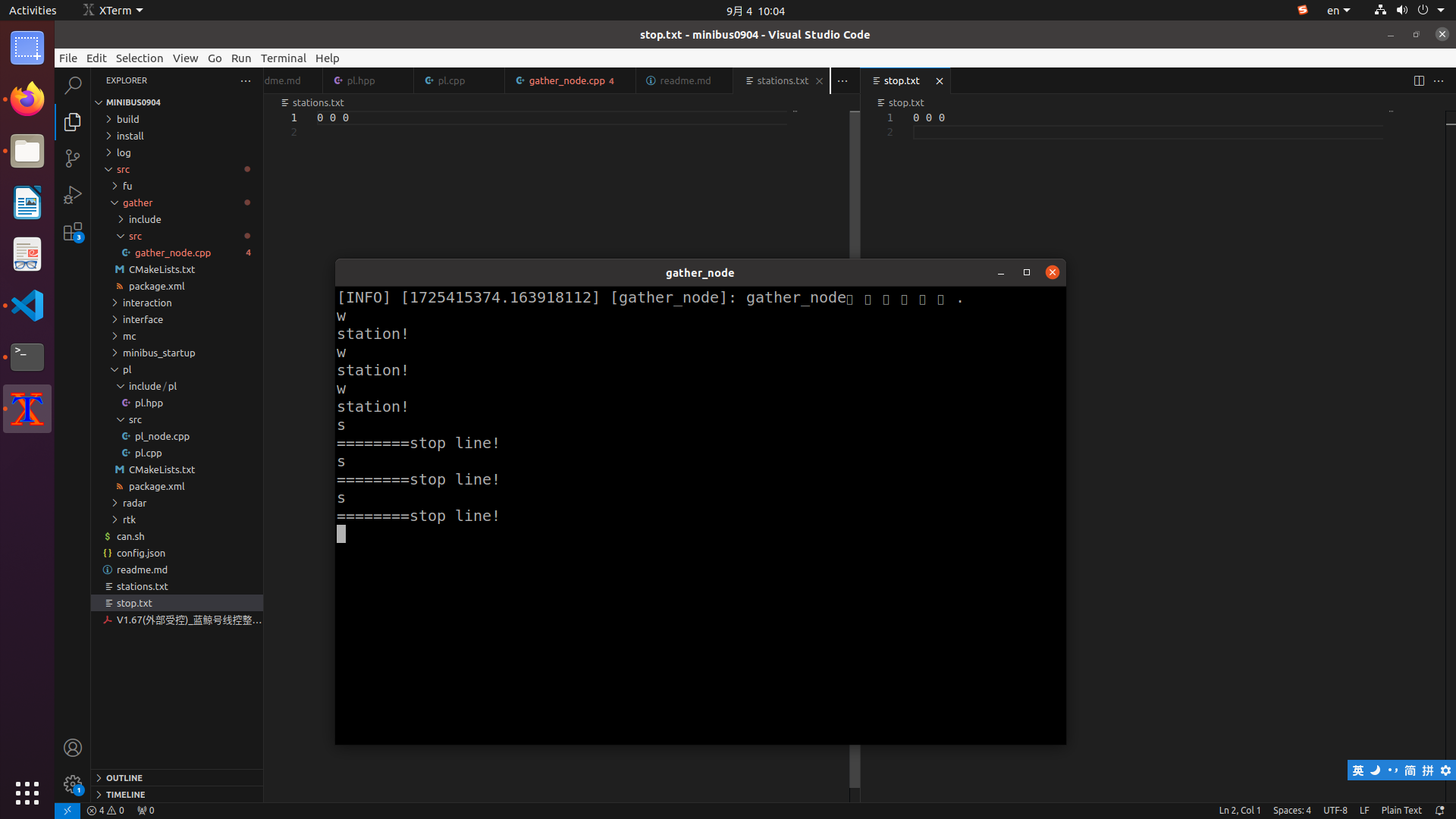
ros2 run gather gather_node # 用来打开采点程序
中途记录位置信息:
找到gather_node终端,键入a(小写)保存站台信息。站台信息组成包括三个点(进入站台的减速点、站台内停止点和驶离站台恢复速度点),所以需要在相应位置键入w。
键入s(小写)保存停止线信息,操作同上。
键入d(小写)保存变道信息,操作同上。